
AI TEST DESIGN · CODE GENERATION · SELF-HEALING

AI-native test automation that keeps improving.

More test coverage. Less maintenance. Full visibility.

From your first business test to a maintainable test suite: TestZombie supports AI test design, code generation, self-healing and optional code updates.
Selenium Java · Playwright TypeScript · Appium Android & iOS
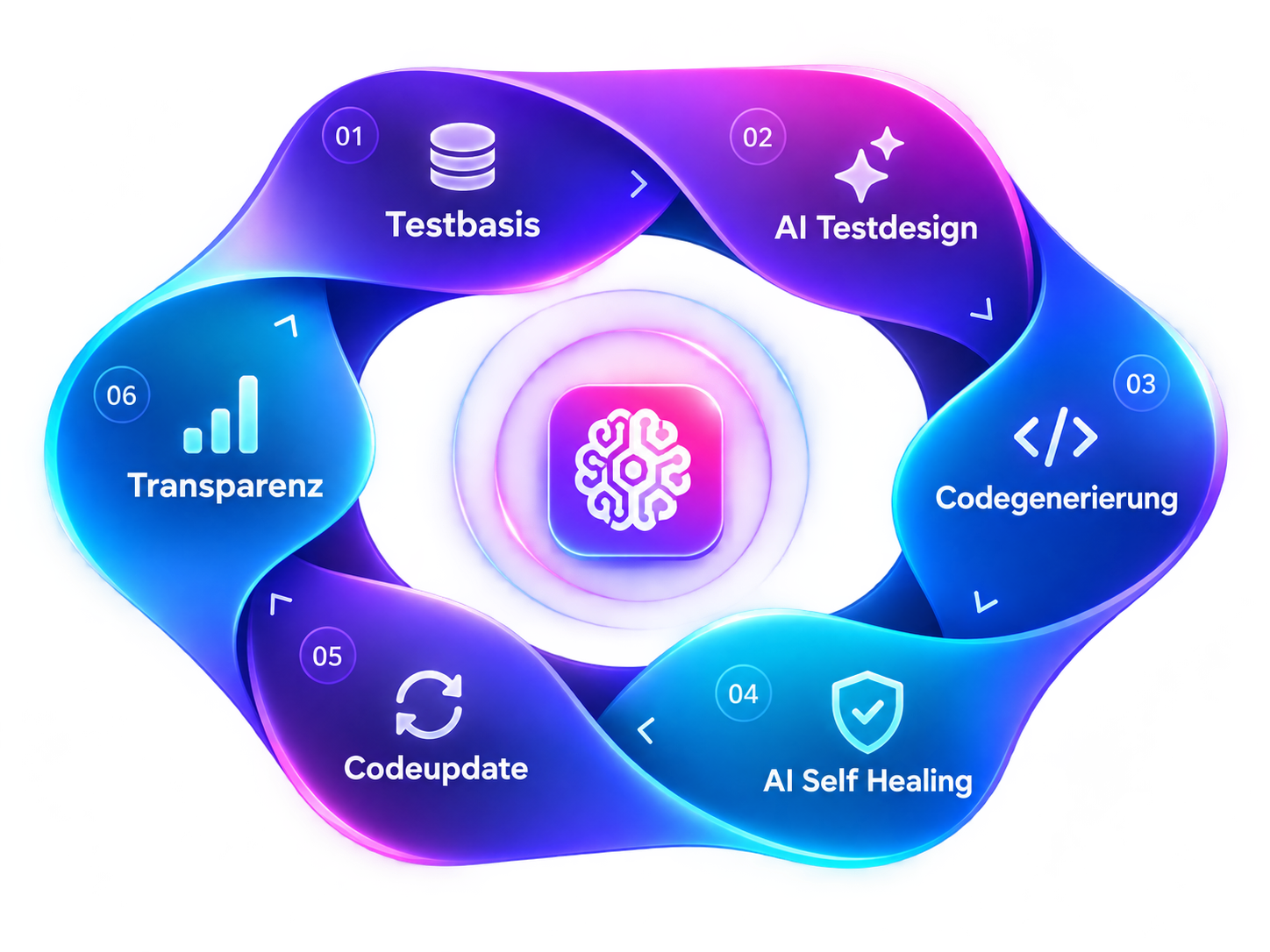
TESTZOMBIE QA LIFECYCLE
Visualization of the TestZombie QA lifecycle with test basis, AI test design, code generation, AI self-healing, code update and transparency
01DISCOVER & DESIGN

Create new business tests. Expand existing flows.

Just enter a website URL: AI Test Designer explores the pages and suggests business test cases, complete with steps and expected results. Or use your existing automated tests as a starting point to discover additional scenarios across entire user journeys. Expand test coverage step by step.

Website URL as starting pointExisting automated flows
What would you like to test? For example:
Successful flowsInput checksError casesBoundary casesNavigationSearchAccessibility+ more
AI TEST DESIGNERILLUSTRATION
Business test · successful flowComplete checkout with valid details
Test objective

A customer can successfully place an order.

Steps
  1. Add an item to the cart
  2. Enter checkout details
  3. Confirm the order
Expected result

The order confirmation page is shown.

checkout.spec.tsPlaywright · TypeScript
// Simplified example · review generated code before using it
test('checkout', async ({ page }) => {
  await page.goto('/checkout');
  await page.getByTestId('pay').click();
  await expect(page).toHaveURL(/success/);
});
An example of generated codeReview & add to suite
02GENERATE

Turn test ideas into automation code.

Choose the business test cases you want to automate. TestZombie generates code for Selenium Java, Playwright TypeScript or Appium Android/iOS. Your team reviews the code and adds it to your existing suite — without starting over.

Selenium JavaPlaywright TypeScriptAppium Android / iOS
Explore code generation →
03EXECUTE, HEAL & MAINTAIN

A UI change does not have to break your tests.

A button is renamed or an input field changes — and suddenly an automated test cannot find its target. TestZombie looks for a suitable alternative and can keep the test running. Successful fixes can also be saved back to your test code, so the same problem does not keep coming back.


Find changed UI elements automatically
Save successful fixes back to your code
Understand each repair and why it happened
See how AI self-healing works →
Checkout flow · Playwright LIVE
!
Locator changedpage.getByRole('button', { name: 'Pay now' })
FAILED
01

A renamed button can cause the test to stop.

◎
TestZombie analyzes the UITestZombie looks for an element that serves the same purpose.
AI
✓
Target recoveredpage.getByTestId('checkout-submit')
HEALED
94%
Matching element foundTestZombie checks whether the alternative fits the test step.
▶
Test continuesThe checkout flow continues without interruption.
RUNNING
04

The test can continue without a manual fix.

↻
Code updatedSuccessful healing is written back to the test
−page.getByRole('button', { name: 'Pay now' })
+page.getByTestId('checkout-submit')
05

The successful fix can be saved back to code.

04OBSERVE

See and understand every repair.

Which tests are running reliably? Where did TestZombie step in, and what changed? Your team can review test runs and fixes in the Automation Cockpit and healing logs. Because a passing test should still be checking the right business behavior.
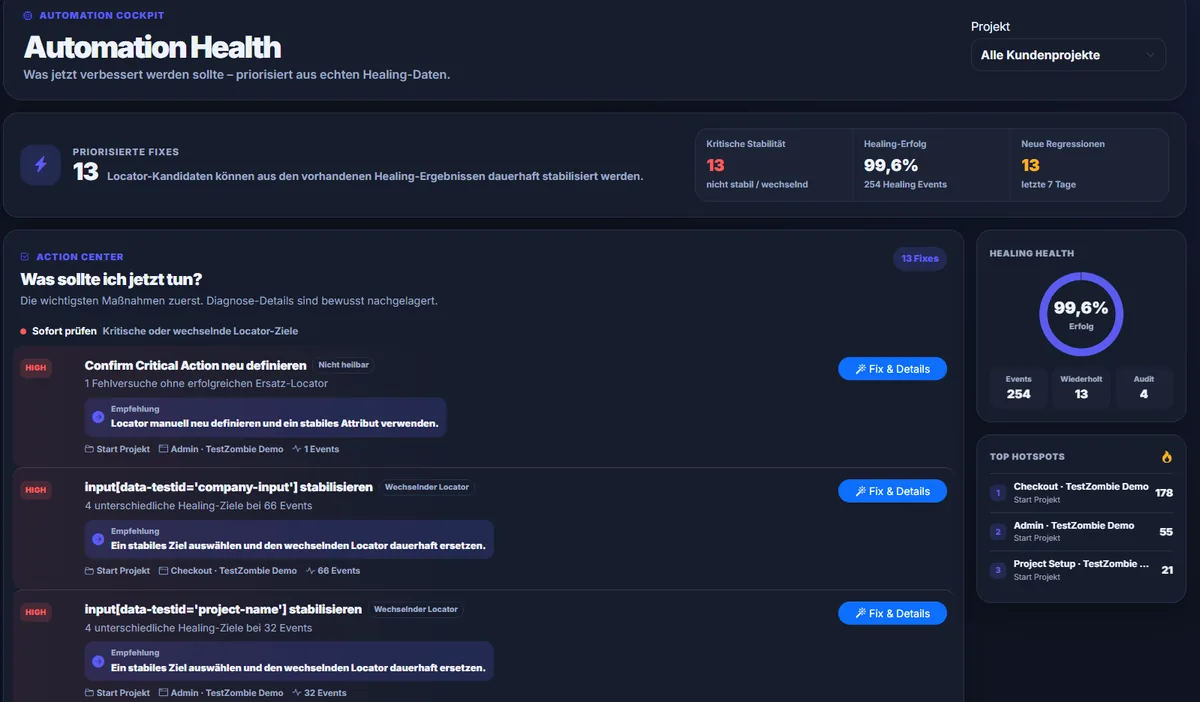
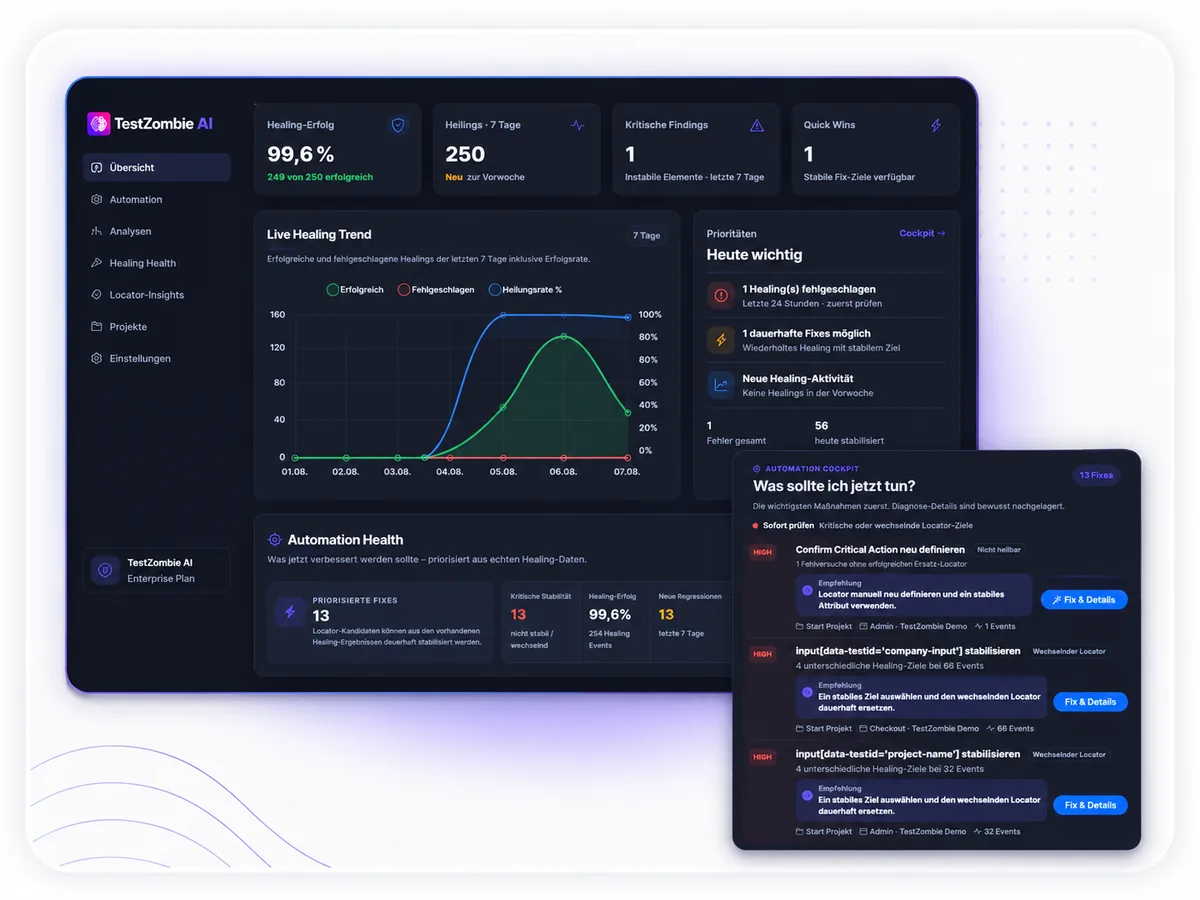
TestZombie Automation Cockpit showing test health and projects
Automation CockpitSee test runs, stability and issues at a glance.
TestZombie Healing Log showing traceable healing events
Healing LogsSee which element was repaired and how.
GOOD TO KNOW

Frequently asked questions about TestZombie AI

Answers to common questions before getting started.

No. Simply enter a website URL in AI Test Designer and start a scan. You can then generate suggested business test cases from the captured pages, review them and choose which ones to use. If you already have automated tests, a discovery run can capture their flows and help you find additional scenarios.

For example, successful purchases and sign-ins, invalid inputs, missing required fields, boundary cases, navigation, search and accessibility checks. Choose different test types to cover more real-life situations and potential failures.

No. TestZombie generates code for Selenium Java, Playwright TypeScript and Appium Android/iOS. You review the generated code before adding it to your existing test suite. Code generation does not replace business review or automatically insert code.

If a test cannot find its original element, TestZombie searches for a suitable alternative. If the match succeeds, the test can continue. You can then optionally update the locator in your test code.

Healing logs show which element was replaced, and code changes remain traceable. You should also check assertions and business outcomes: a technical repair alone does not prove the test still validates the intended behavior.
TAKE THE NEXT STEP

Broader test coverage. Less maintenance effort.

Start with a website URL or expand your existing tests. TestZombie supports the journey from business test to traceable repair.

Get to know TestZombie